1. What We Are Building
Most search results for “Godot 4 bullet hell tutorial” point you to a plugin or a forum thread arguing about whether bullets should be nodes. This guide does something different: it walks through a complete, working vertical shmup in Godot 4.6 and shows the real code that makes it tick. Every excerpt below is copied from the project’s scripts.
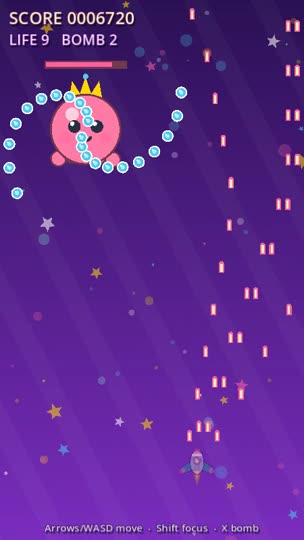
The game has a player rocket with focus mode and bombs, three enemy types (a Popper that fires aimed fans, a Flower that fires spirals, and the Jelly Queen boss with a three-phase pattern cycle), looping waves that get harder, plus score, lives and game over. It uses no sprites or physics bodies at all: everything is drawn with _draw() and collisions are distance checks.
The whole game is six scripts attached to plain Node2D nodes in one scene:
Main (main.gd)            waves, collisions, score, lives, bombs
├─ Background (background.gd)   gradient + scrolling dots and stars
├─ Enemies                        enemy.gd instances are added here
├─ Player (player.gd)
├─ BulletField (bullet_field.gd) every bullet, as plain data
├─ FX (fx.gd)                     pop rings, sparks, score popups
└─ HUD (CanvasLayer)              ScoreLabel, LivesLabel, Banner, HintLabel
2. Portrait Viewport and Stretch Setup
Vertical shmups are tall. The project sets a fixed 540×960 design resolution and lets Godot scale it to the window. From project.godot:
[display]

window/size/viewport_width=540
window/size/viewport_height=960
window/size/window_width_override=450
window/size/window_height_override=800
window/stretch/mode="canvas_items"
The viewport size is the coordinate space your code uses: every script can assume the play field is 540 wide and 960 tall, which is why constants like const W := 540.0 and const H := 960.0 appear in the bullet and background scripts. The window override opens a smaller 450×800 window so it fits on a typical desktop monitor, and the canvas_items stretch mode scales the 2D canvas to fill it. The project also uses the GL Compatibility renderer, a good fit for a 2D game that should run on modest hardware.
Input actions are defined in the same file: move_left/right/up/down (arrow keys and WASD), focus (Shift), bomb (X) and restart (Enter and R).
3. Player: Movement, Focus Mode and Auto-Fire
The player is a Node2D with three constants that define how it feels:
const SPEED := 340.0
const FOCUS_SPEED := 150.0
const HITBOX := 4.0
A 4-pixel hitbox on a rocket that is roughly 60 pixels wide is the genre convention: the sprite is big and readable, but only the tiny core can be hit. Movement uses Input.get_vector, so diagonals are normalized, and holding focus switches to the slow speed for precise dodging:
var dir := Input.get_vector("move_left", "move_right", "move_up", "move_down")
focus = Input.is_action_pressed("focus")
position += dir * (FOCUS_SPEED if focus else SPEED) * delta
position = position.clamp(Vector2(20, 40), Vector2(520, 930))
Auto-fire with a focused shot
There is no fire button. A cooldown of 0.075 seconds fires two straight shots every time it expires, and two angled side shots are added only when not focused. Focus therefore trades coverage for concentration, the classic shmup trade-off:
fire_cd -= delta
if fire_cd <= 0.0 and field:
	fire_cd = 0.075
	field.shoot(position + Vector2(-8, -20), Vector2(0, -950))
	field.shoot(position + Vector2(8, -20), Vector2(0, -950))
	if not focus:
		field.shoot(position + Vector2(-16, -6), Vector2(-170, -900))
		field.shoot(position + Vector2(16, -6), Vector2(170, -900))
Notice that the player does not spawn bullet scenes. It calls field.shoot() on the BulletField node, which we cover next.
A visible hitbox
Players can only dodge precisely if they can see the hitbox. At the end of _draw() the rocket always paints a small pink-and-white dot at its center, and while focusing it adds a spinning three-quarter ring around it:
if focus:
	draw_arc(Vector2.ZERO, 14.0, t * 4.0, t * 4.0 + TAU * 0.75, 24, Color(1, 1, 1, 0.8), 2.0)
draw_circle(Vector2.ZERO, HITBOX + 1.5, Color("ff006e"))
draw_circle(Vector2.ZERO, HITBOX - 1.0, Color.WHITE)
The same _draw() also blinks the rocket (alpha 0.35 on alternating frames) while the invuln timer is running after a hit.
4. Storing and Drawing Many Bullets
This is the part that answers “Godot many bullets performance”. The common beginner approach is one scene per bullet: an Area2D with a sprite and a collision shape, instantiated on fire and freed when it leaves the screen. That works, but every bullet then becomes a full node with its own spot in the scene tree, its own processing and its own allocation and free.
This project takes the opposite approach. A single node, BulletField, keeps every bullet as plain data:
extends Node2D
## Holds and draws all bullets (enemy bullets + player shots) as plain data for speed.

var enemy_bullets: Array = []
var shots: Array = []

func spawn(pos: Vector2, vel: Vector2, color: Color, radius := 9.0, curve := 0.0) -> void:
	enemy_bullets.append({"p": pos, "v": vel, "c": color, "r": radius, "w": curve})

func shoot(pos: Vector2, vel: Vector2) -> void:
	shots.append({"p": pos, "v": vel, "dead": false})
An enemy bullet is just a position, a velocity, a color, a radius and a curve value. Firing one is an append to an array: no instancing, no add_child.
One loop to move them all
Each frame, the field moves every bullet, bends the velocity of curving bullets, and drops anything that has left the 540×960 play area (with a small margin) using Array.filter:
for b in enemy_bullets:
	var v: Vector2 = b.v
	if b.w != 0.0:
		v = v.rotated(b.w * delta)
		b.v = v
	b.p += v * delta
enemy_bullets = enemy_bullets.filter(func(b):
	var p: Vector2 = b.p
	return p.x > -40.0 and p.x < W + 40.0 and p.y > -60.0 and p.y < H + 40.0)
The w field is a turn rate in radians per second. Rotating the velocity a little every frame makes a bullet travel along a curve, which the boss uses for its bending spirals. Player shots get the same treatment and are removed when they hit something (dead) or fly off the top.
One draw call site for every bullet
Drawing happens in a single _draw() on the same node, after queue_redraw() is called at the end of _process(). Each enemy bullet is four stacked circles — a white rim, the colored body, a lighter core and a highlight — which gives the candy look without any texture:
for b in enemy_bullets:
	var p: Vector2 = b.p
	var r: float = b.r
	var c: Color = b.c
	draw_circle(p, r + 2.5, Color.WHITE)
	draw_circle(p, r, c)
	draw_circle(p, r * 0.45, c.lightened(0.6))
	draw_circle(p - Vector2(r, r) * 0.35, r * 0.22, Color(1, 1, 1, 0.9))
Why this is faster than a node per bullet
To be precise about what this code actually avoids:
- No node lifecycle per bullet. Spawning is an array append and despawning is a filter. Nothing is instanced, added to the tree or queued for freeing.
- One
_processcallback, not hundreds. The engine calls one script function per frame for all bullets instead of one per bullet. - One canvas item. All bullets are drawn by one node’s
_draw(), so there is one item to redraw rather than one sprite node per bullet. - No physics bodies. Hits are distance checks in
main.gd(section 7), notArea2Doverlaps.
It also makes “clear the screen” trivial, which bombs and boss kills rely on: clear_enemy_bullets() spawns a pop effect on every third bullet, calls enemy_bullets.clear() and returns how many there were so the caller can award points.
This demo stores bullets as GDScript Dictionaries and redraws them with draw_circle every frame, which is simple and was enough for this game. It was not benchmarked here. If you push into thousands of bullets, profile first; typical next steps are packed arrays instead of Dictionaries, a textured draw_texture per bullet instead of four circles, or a MultiMeshInstance2D.
5. Bullet Patterns: Fans, Spirals, Rings
All patterns come down to one call: field.spawn(position, Vector2.from_angle(angle) * speed, color, radius). The pattern is just how you choose the angles. Every enemy also multiplies its bullet speed by spd(), which grows with the difficulty level:
func spd() -> float:
	return 1.0 + 0.15 * level
Aimed fan (the Popper)
Take the angle from the enemy to the player, then fire three bullets offset by -0.25, 0 and +0.25 radians. The middle bullet is aimed straight at the player, the outer two punish lazy sidesteps. The Popper only fires while it is between y = 40 and y = 680, so it never shoots from off-screen or point-blank at the bottom:
fire_t -= delta
if fire_t <= 0.0 and position.y > 40.0 and position.y < 680.0:
	fire_t = 1.6 - minf(level * 0.15, 0.6)
	var base := (player.position - position).angle()
	for i in 3:
		field.spawn(position, Vector2.from_angle(base + (i - 1) * 0.25) * 200.0 * spd(), color, 9.0)
Rotating spiral (the Flower)
A spiral is a ring with very few bullets, fired very often, whose starting angle moves with time. The Flower fires every 0.11 seconds; its arms are spaced evenly around TAU and t * 2.2 rotates the whole set. Colors alternate between arms:
fire_t = 0.11
var arms := 3 + mini(level, 2)
for i in arms:
	var a := t * 2.2 + TAU * i / arms
	var c := Color("c77dff") if i % 2 == 0 else Color("ff8fab")
	field.spawn(position, Vector2.from_angle(a) * 150.0 * spd(), c, 8.0)
The Flower eases down to its target_y with lerpf, fires for 7 seconds, then flies back up off the screen. Later loops give it up to five arms.
Ring
A ring is the same formula with many bullets fired at once and a long pause in between. The boss’s first phase is a ring of 20 + level * 4 bullets; adding t to the angle shifts each ring slightly so the gaps never line up twice:
fire_t = 0.8
var n := 20 + level * 4
for i in n:
	var c := Color("ff5fa2") if i % 2 == 0 else Color("ffd60a")
	field.spawn(position, Vector2.from_angle(t + TAU * i / n) * 170.0 * spd(), c, 10.0)
6. The Boss Pattern Cycle
The Jelly Queen (enemy kind 2) has 500 HP plus 200 per difficulty level, a radius of 60 and a crown drawn with draw_colored_polygon. It drifts down to y = 230 and sways side to side with position.x = 270.0 + sin(t * 0.7) * 120.0. Its attack is chosen by a timer, not a state machine:
var phase := int(t / 6.0) % 3Every six seconds the phase advances, cycling 0 → 1 → 2 → 0 for as long as the boss lives:
| Phase | Pattern | Fire interval | Details |
|---|---|---|---|
| 0 | Ring | 0.8 s | 20 + 4 per level bullets, pink and yellow, speed 170 |
| 1 | Bending double spiral | 0.07 s | Two opposite arms, curve +0.35 and -0.35, speed 190 |
| 2 | Aimed 7-way fan | 0.5 s | Spacing 0.14 rad, speed 260, aimed at the player |
Phase 1 is where the curve parameter of spawn() earns its keep. Two arms 180° apart rotate quickly, and each arm’s bullets bend in opposite directions:
fire_t = 0.07
for k in 2:
	var a := t * 3.0 + PI * k
	var bend := 0.35 if k == 0 else -0.35
	field.spawn(position, Vector2.from_angle(a) * 190.0 * spd(), Color("4cc9f0"), 8.0, bend)
Alternating a dense, slow, readable ring, a fast swirling spiral and a fast aimed fan forces the player to switch between reading gaps, weaving and focus-dodging. The boss also draws its own HP bar above its crown using hp / max_hp.
7. Collision Checks
With bullets as data, collisions are a loop in main.gd. Player shots are tested against every enemy with a distance check against the enemy’s radius plus 6 pixels; a hit marks the shot dead, deals 1 damage and adds 10 points:
if sp.distance_to(e.position) < e.radius + 6.0:
	s.dead = true
	e.hit(1.0)
	score += 10
Enemy bullets are tested only against the player, and only when the player is not invulnerable. Note the forgiving radius: a bullet only counts as touching if it is within 70% of its drawn radius plus the 4-pixel hitbox. Bullet hell games feel fair when the hit area is smaller than what you see:
if player.invuln > 0.0:
	return
var pp: Vector2 = player.position
for b in field.enemy_bullets:
	var bp: Vector2 = b.p
	if bp.distance_to(pp) < b.r * 0.7 + player.HITBOX:
		_player_hit()
		return
Touching an enemy body also counts as a hit, using 80% of the enemy radius.
8. Bombs
Press X to bomb. You start with two. A bomb clears every enemy bullet (10 points each), shakes the screen, gives at least 1.5 seconds of invulnerability and deals 30 damage to every enemy on screen — enough to kill a fresh Popper and badly hurt a Flower:
func _use_bomb() -> void:
	if bombs <= 0 or not player.alive:
		return
	bombs -= 1
	score += field.clear_enemy_bullets() * 10
	fx.pop(player.position, Color.WHITE, 6.0)
	shake = 0.4
	player.invuln = maxf(player.invuln, 1.5)
	for e in enemies.get_children():
		e.hit(30.0)
Screen shake is implemented by offsetting the Main node’s own position by a random amount scaled by the remaining shake time. Because the HUD is on a CanvasLayer, the score text stays still while the play field shakes.
9. Waves and the Difficulty Loop
Waves are a spawn queue of [time, kind, x] entries. The wave number picks one of four layouts, and every completed set of four raises level:
level = int((wave - 1) / 4.0)
match (wave - 1) % 4:
	0:
		for i in 8:
spawn_queue.append([i * 0.45, 0, randf_range(60.0, 480.0)])- Wave 1: eight Poppers at random x positions, 0.45 s apart.
- Wave 2: two Flowers at x = 150 and 390, then a line of six Poppers.
- Wave 3: a V formation of ten Poppers followed by a Flower in the center.
- Wave 4: the Jelly Queen, announced with a “BOSS!” banner.
_process() spawns queue entries whose time has come, and starts the next wave once the queue is empty, no enemies remain and at least one second has passed. Then the cycle repeats with a higher level, which feeds into almost every number in enemy.gd:
- Enemy HP: Popper
5 + 2 * level, Flower45 + 15 * level, boss500 + 200 * level. - Bullet speed:
spd()adds 15% per level. - Popper fire interval drops from 1.6 s by 0.15 s per level, capped at 1.0 s.
- Flower arms grow from 3 to at most 5; the boss ring gains 4 bullets per level.
Poppers do not stay on screen forever. After three seconds of drifting down they swerve to the nearer edge and leave:
else:
	# swerve away to the nearest side and leave the screen
	var side := -1.0 if position.x < 270.0 else 1.0
	position.x += side * 220.0 * delta
	position.y += 40.0 * delta
Any enemy that leaves the area around the screen frees itself, so waves always end.
10. Score, Lives and Game Over
Points come from four sources: 10 per shot that lands, the enemy’s score_value on a kill (100 Popper, 500 Flower, 5000 boss), and 10 per bullet cleared by a bomb or by the boss’s death. Killing the boss clears the screen, shows a “SWEET!” banner and shakes the screen. The HUD formats the score as "SCORE %07d".
You have three lives. Getting hit costs a life, clears all enemy bullets (so you are never hit twice by the same wall), gives 2.5 seconds of invulnerability and tops your bombs back up to at least two. When the last life goes, the game freezes and waits for a restart:
if game_over:
	if Input.is_action_just_pressed("restart"):
		get_tree().reload_current_scene()
	return
Reloading the scene is the simplest correct restart: every array, timer and enemy is rebuilt from scratch, so no state leaks into the next run.
11. Building It with AI
This game was not written by hand. Claude Code built it from one prompt in about five minutes of AI work, using Godot MCP Pro to create the scene, write the scripts, run the game and play-test it inside the Godot editor. This was the entire prompt:
Because the AI could actually run the game, simulate input and look at screenshots, it caught three bugs during its own play-testing that you would never spot by reading the code:
- Enemies drifted into the player’s lane. Poppers kept drifting down toward the bottom of the screen, where the player is. They now swerve away to the nearest side after three seconds (the excerpt in section 9).
- The victory banner after the boss was replaced instantly. The next wave’s banner overwrote “SWEET!” right away. The boss death now sets
wave_t = -1.5, commented as a breather before the next wave. - The GAME OVER banner stayed hidden behind a fading wave banner. The game-over branch now resets the banner timer and forces it fully visible, and the fade-out only runs while the game is not over.
Watch the build on the bullet hell showcase page or on YouTube. Once the core works, follow-up prompts like “add a second boss with a laser phase” or “add graze scoring” are where you make it your own.
Build Your Own Shmup by Chat
Godot MCP Pro lets AI assistants like Claude Code build scenes, write GDScript, run your game, simulate input and read screenshots and errors inside the Godot 4 editor — 190 tools in all.
play_scene
simulate_key
get_game_screenshot
create_script
get_editor_errors
One-time purchase · Lifetime updates · See pricing details
12. FAQ
Should every bullet be its own node or Area2D in Godot 4?
Not necessarily. In this project every bullet is a small Dictionary inside one BulletField node. That node moves all bullets in one _process loop and draws them all in one _draw call, and collisions are plain distance checks, so no node is created or freed per bullet.
How do you make spiral bullet patterns in Godot?
Fire a few bullets at a short interval and add the elapsed time to the firing angle, for example Vector2.from_angle(t * 2.2 + TAU * i / arms). Spreading the arms evenly around TAU and letting time rotate them produces a rotating spiral.
How does focus mode work in a Godot shmup?
While the focus action (Shift) is held, the player moves at 150 instead of 340 pixels per second, stops firing the two angled side shots, and draws a spinning ring around the 4-pixel hitbox, which is always shown as a small dot.
Was this bullet hell built with AI?
Yes. Claude Code built it from one prompt in about five minutes of AI work using Godot MCP Pro, which let it run the game, play-test it and fix three bugs it found on its own.