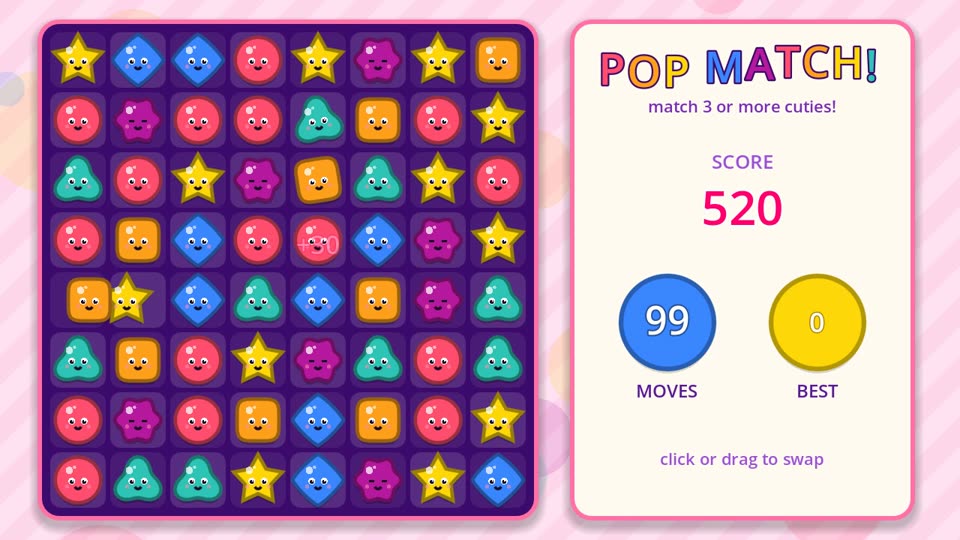
1. What We're Building
Most match-3 tutorials you'll find for Godot were written for Godot 3 and use yield, update() and a scene per piece. This one walks through a complete, working match-3 for Godot 4.6, written in GDScript 2.0, that lives in a single script on a single Node2D. Every excerpt below is copied from the real file (scripts/match3.gd); only indentation was changed for the web.
The game, Pop Match!, has:
- an 8×8 board with six piece types, drawn with
_draw()— no image assets; - click-to-select and drag-to-swap input;
- invalid swaps that slide back without costing a move;
- horizontal and vertical match detection, gravity and refill;
- cascades with a combo multiplier;
- a hint after five idle seconds, and an automatic reshuffle when no move is left;
- 25 moves per game, a score, a best score and a game-over screen.
The core idea that keeps all of this simple: the game state is plain arrays, and the animation is a separate per-cell pixel offset. Logic changes the arrays instantly; the offsets then shrink to zero over the next frames, which is what you see as movement.
2. Project Setup
- Create a new Godot 4.6 project. The original uses the Compatibility renderer and a 1280×720 viewport (Project Settings → Display → Window), because the HUD positions are hard-coded for that size.
- Create a scene with a single
Node2Droot namedMain, save it asres://scenes/main.tscnand set it as the main scene. - Attach a new script,
res://scripts/match3.gd, thatextends Node2D.
That's the whole scene tree. Start the script with the constants that define the board:
const COLS := 8
const ROWS := 8
const CELL := 80.0
const ORIGIN := Vector2(64, 40)
const TYPES := 6
const START_MOVES := 25
const MOVE_SPEED := 900.0
const COLORS := [Color("ff4d6d"), Color("ff9f1c"), Color("ffd60a"), Color("2ec4b6"), Color("3a86ff"), Color("b5179e")]
const NONE := Vector2i(-1, -1)
CELL is the cell size in pixels and ORIGIN is the top-left corner of the board on screen. NONE is a sentinel Vector2i meaning “no cell selected”.
3. The Grid Data Model
The board is four parallel 2D arrays, indexed [y][x] (row first):
var grid: Array = []
var offs: Array = []
var scl: Array = []
var popping: Array = []
var selected := NONEgridholds the piece type,0–5, or-1for an empty cell.offsholds aVector2pixel offset per cell. A piece is drawn at its cell center plus this offset.sclis a per-cell draw scale used for the selection pulse, the pop-out and a little “boing” on landing.poppingmarks cells that are shrinking away after a match.
When new_game() fills the board, it must not create matches up front. It fills row by row and re-rolls a piece while it would complete three in a row with the two cells to its left or the two cells above it. Then it makes sure at least one move exists:
    for y in ROWS:
        for x in COLS:
            var tp := randi() % TYPES
            while (x >= 2 and grid[y][x - 1] == tp and grid[y][x - 2] == tp) \
                    or (y >= 2 and grid[y - 1][x] == tp and grid[y - 2][x] == tp):
                tp = randi() % TYPES
            grid[y][x] = tp
    if not has_moves():
        new_game()
        return
Earlier in the same function, every cell's offset starts at Vector2(0, -CELL * (ROWS + 1) - y * 10), so the whole board drops in from above when a game starts — a free intro animation.
A few small helpers convert between cells and pixels:
func cell_center(c: Vector2i) -> Vector2:
    return ORIGIN + (Vector2(c) + Vector2(0.5, 0.5)) * CELL


func pos_to_cell(p: Vector2) -> Vector2i:
    var v := (p - ORIGIN) / CELL
    return Vector2i(floori(v.x), floori(v.y))


func in_board(c: Vector2i) -> bool:
    return c.x >= 0 and c.y >= 0 and c.x < COLS and c.y < ROWS


func is_adjacent(a: Vector2i, b: Vector2i) -> bool:
    return absi(a.x - b.x) + absi(a.y - b.y) == 1
is_adjacent uses Manhattan distance: exactly one step horizontally or vertically, never diagonally. Note floori() rather than int(): a click just left of the board gives -0.3, which floori turns into -1 (outside the board) while int() would truncate it to 0.
4. Drawing the Board with _draw()
Instead of a node per piece, Node2D._draw() paints the whole board every frame. At the end of _process() the script calls queue_redraw(), which tells Godot to run _draw() again. The piece loop is short:
    for y in ROWS:
        for x in COLS:
            var tp: int = grid[y][x]
            if tp == -1:
                continue
            var c := Vector2i(x, y)
            var p: Vector2 = cell_center(c) + offs[y][x] + shk
            var alpha := clampf((p.y - (ORIGIN.y - CELL * 0.4)) / (CELL * 0.6), 0.0, 1.0)
            var s: float = scl[y][x]
            var wob := 0.0
            if c == selected:
                s *= 1.0 + 0.08 * sin(t * 10.0)
            elif hint.has(c):
                wob = sin(t * 14.0) * 0.18
            draw_piece(p, tp, s, alpha, wob)
Two details are worth copying into any match-3. First, alpha fades a piece in as it crosses the top edge of the board, so new pieces falling from above don't pop into view over the HUD or background. Second, shk is a random screen-shake vector added to everything on the board.
draw_piece() builds an outline with shape_pts() (a circle, squircle, star, soft triangle, diamond or flower depending on type), then uses draw_set_transform() so the shape can be drawn around the origin and still be moved, scaled and wobbled:
    draw_set_transform(p, wobble, Vector2(s, s))
    var pts := shape_pts(tp, r)
    var shadow := PackedVector2Array()
    for q in pts:
        shadow.append(q + Vector2(0, 5))
    draw_colored_polygon(shadow, Color(0, 0, 0, 0.25 * alpha))
    draw_colored_polygon(pts, Color(col, alpha))
    var outline := pts.duplicate()
    outline.append(pts[0])
    draw_polyline(outline, Color(col.darkened(0.4), alpha), 3.5, true)
The rest of the function adds shine dots and a face with eyes that blink, then resets the transform with draw_set_transform(Vector2.ZERO). The board background and tiles use StyleBoxFlat resources created in code and drawn with draw_style_box(). If you'd rather use sprites, replace the body of draw_piece() with a draw_texture() call — none of the game logic depends on how pieces look.
5. Input: Click and Drag to Swap
Input goes through _unhandled_input(). A press either selects a cell, deselects it, or — if a neighbor is already selected — swaps the two:
    if e is InputEventMouseButton and e.button_index == MOUSE_BUTTON_LEFT:
        if not e.pressed:
            dragging = false
            return
        if game_over:
            if over_time > 0.6:
                new_game()
            return
        if busy:
            return
        idle_time = 0
        hint = []
        var c := pos_to_cell(e.position)
        if not in_board(c):
            selected = NONE
            return
        if selected != NONE and is_adjacent(selected, c):
            var a := selected
            selected = NONE
            try_swap(a, c)
        elif selected == c:
            selected = NONE
        else:
            selected = c
            scl[c.y][c.x] = 1.2
            dragging = true
            drag_start = e.position
Selecting also starts a drag. While the button is held, mouse motion past 45% of a cell picks the dominant axis and swaps toward it:
    elif e is InputEventMouseMotion and dragging and not busy and selected != NONE:
        var d: Vector2 = e.position - drag_start
        if d.length() > CELL * 0.45:
            var dir := Vector2i(int(signf(d.x)), 0) if absf(d.x) > absf(d.y) else Vector2i(0, int(signf(d.y)))
            var target := selected + dir
            var a := selected
            dragging = false
            selected = NONE
            if in_board(target):
                try_swap(a, target)
The busy flag is the most important line here: while pieces are moving or a cascade is resolving, input is ignored. Without it, a fast player could swap in the middle of a gravity step and corrupt the board.
6. Swapping, Animating and Swapping Back
The swap itself changes the data immediately, then sets offsets so each piece is drawn where it came from:
func do_swap(a: Vector2i, b: Vector2i) -> void:
    var tmp = grid[a.y][a.x]
    grid[a.y][a.x] = grid[b.y][b.x]
    grid[b.y][b.x] = tmp
    offs[a.y][a.x] = cell_center(b) - cell_center(a)
    offs[b.y][b.x] = cell_center(a) - cell_center(b)


func settle() -> void:
    while true:
        await get_tree().process_frame
        var moving := false
        for y in ROWS:
            for x in COLS:
                if offs[y][x].length_squared() > 0.01:
                    moving = true
        if not moving:
            return
Every frame, _process() moves each offset toward zero at MOVE_SPEED pixels per second, so pieces glide into place. settle() is a coroutine: it waits one frame at a time until no offset is left, which lets game logic simply await settle() instead of juggling tweens or signals.
    for y in ROWS:
        for x in COLS:
            var was: Vector2 = offs[y][x]
            if was != Vector2.ZERO:
                offs[y][x] = was.move_toward(Vector2.ZERO, MOVE_SPEED * delta)
                if offs[y][x] == Vector2.ZERO and was.y < 0:
                    scl[y][x] = 1.18  # landing boing
            if popping[y][x]:
                scl[y][x] = move_toward(scl[y][x], 0.0, delta * 5.0)
            else:
                scl[y][x] = lerpf(scl[y][x], 1.0, minf(1.0, delta * 10.0))
Now the turn logic. try_swap() swaps, waits, and checks for matches. No match? Swap again (which animates the pieces back) and return without spending a move:
func try_swap(a: Vector2i, b: Vector2i) -> void:
    busy = true
    do_swap(a, b)
    await settle()
    var m := find_matches()
    if m.is_empty():
        do_swap(a, b)
        await settle()
        busy = false
        return
    moves -= 1
    combo = 0
    await resolve(m)
    if not has_moves():
        await reshuffle()
    busy = false
    idle_time = 0
    if moves <= 0:
        game_over = true
        over_time = 0
        best = maxi(best, score)
Reading top to bottom, that function is the whole turn: swap, validate, resolve every cascade, reshuffle if stuck, then check for game over. That readability is what await buys you.
7. Finding Matches
find_matches() scans each row for runs of the same type, then each column, and records every cell in a run of three or more. A Dictionary keyed by Vector2i works as a set, so a cell that belongs to both a horizontal and a vertical run (an L or T shape) is only counted once:
func find_matches() -> Array:
    var marked := {}
    for y in ROWS:
        var x := 0
        while x < COLS:
            var tp = grid[y][x]
            var e := x
            while e + 1 < COLS and grid[y][e + 1] == tp:
                e += 1
            if tp != -1 and e - x >= 2:
                for i in range(x, e + 1):
                    marked[Vector2i(i, y)] = true
            x = e + 1
    for x in COLS:
        var y := 0
        while y < ROWS:
            var tp = grid[y][x]
            var e := y
            while e + 1 < ROWS and grid[e + 1][x] == tp:
                e += 1
            if tp != -1 and e - y >= 2:
                for i in range(y, e + 1):
                    marked[Vector2i(x, i)] = true
            y = e + 1
    return marked.keys()
The run scan is linear: e extends as far as the type repeats, and the outer loop jumps straight past the run with x = e + 1. The tp != -1 check keeps runs of empty cells from counting as a match. A run of four or five just marks more cells; this version gives no special pieces for them, which is the obvious next feature to add.
8. Clearing, Gravity, Refill and Cascades
resolve() loops for as long as the board has matches. Each pass is one cascade “wave”, and the combo counter grows with every wave:
func resolve(m: Array) -> void:
    while not m.is_empty():
        combo += 1
        var gained: int = m.size() * 10 * combo
        score += gained
        var center := Vector2.ZERO
        for c in m:
            popping[c.y][c.x] = true
            center += cell_center(c)
            spawn_particles(cell_center(c), COLORS[grid[c.y][c.x]])
        center /= m.size()
        center.y = maxf(center.y, ORIGIN.y + CELL * 1.2)
        var txt := "+%d" % gained
        if combo > 1:
            txt += "  COMBO x%d!" % combo
        popups.append({"p": center, "text": txt, "life": 1.0})
        shake = 4.0 + 3.0 * combo
        await get_tree().create_timer(0.2).timeout
        for c in m:
            grid[c.y][c.x] = -1
            popping[c.y][c.x] = false
            scl[c.y][c.x] = 1.0
        apply_gravity()
        await settle()
        m = find_matches()
Scoring is cells × 10 × combo. A plain three-match on your move is worth 30; if the falling pieces then form another three-match, that wave is worth 60, the next 90, and so on. try_swap() resets combo to 0 before each move, so the multiplier only counts chain reactions. The 0.2-second timer gives the pop animation time to play before the cells are actually emptied.
Gravity works column by column with a “write” pointer that starts at the bottom. Every non-empty cell is copied down to the write position, and the leftover cells at the top get new random pieces:
func apply_gravity() -> void:
    for x in COLS:
        var write := ROWS - 1
        for y in range(ROWS - 1, -1, -1):
            if grid[y][x] != -1:
                if y != write:
                    grid[write][x] = grid[y][x]
                    grid[y][x] = -1
                    offs[write][x] = offs[y][x] + Vector2(0, (y - write) * CELL)
                    offs[y][x] = Vector2.ZERO
                write -= 1
        var missing := write + 1
        for y in range(write, -1, -1):
            grid[y][x] = randi() % TYPES
            offs[y][x] = Vector2(0, -missing * CELL)
            scl[y][x] = 1.0
The same offset trick drives the animation. A piece that moved down three rows gets an offset of -3 * CELL, so it is still drawn in its old spot and falls from there. Refilled pieces start missing cells above their slot, so a column with three gaps drops three new pieces in from above the board, where the alpha fade from _draw() hides them until they enter. Because gravity is in the same loop as matching, cascades need no extra code: after settle(), find_matches() runs again and the loop continues until the board is stable.
9. Hints and Reshuffle
To find a valid move, the game simply tries every swap. For each cell it swaps with the right and lower neighbor using a data-only swap, checks for a match, and swaps back:
func find_hint() -> Array:
    for y in ROWS:
        for x in COLS:
            var a := Vector2i(x, y)
            for d in [Vector2i(1, 0), Vector2i(0, 1)]:
                var b: Vector2i = a + d
                if not in_board(b):
                    continue
                _swap_raw(a, b)
                var ok := not find_matches().is_empty()
                _swap_raw(a, b)
                if ok:
                    return [a, b]
    return []


func has_moves() -> bool:
    return not find_hint().is_empty()
_swap_raw() swaps only the grid values, without the visual offsets. On an 8×8 board that is 112 swap checks, each a scan of 64 cells, which is cheap enough to run whenever it's needed. Checking only right and down covers every pair, since swapping A with B is the same as swapping B with A.
The hint appears when the player has been idle for five seconds. _process() counts idle time and caches the result in hint, which _draw() turns into a wobble on the two pieces:
    if game_over:
        over_time += delta
    elif not busy:
        idle_time += delta
        if idle_time > 5.0 and hint.is_empty():
            hint = find_hint()
If a move leaves the board with no valid swap, try_swap() calls reshuffle(). It collects all piece types, shuffles them, and repeats until the board has no ready-made matches but does have at least one move:
func reshuffle() -> void:
    popups.append({"p": ORIGIN + Vector2(COLS, ROWS) * CELL * 0.5, "text": "SHUFFLE!", "life": 1.2})
    var vals := []
    for y in ROWS:
        for x in COLS:
            vals.append(grid[y][x])
    while true:
        vals.shuffle()
        for i in vals.size():
            grid[floori(i / float(COLS))][i % COLS] = vals[i]
        if find_matches().is_empty() and has_moves():
            break
    for y in ROWS:
        for x in COLS:
            scl[y][x] = 0.1
    await get_tree().create_timer(0.4).timeout
Shuffling the existing pieces, rather than rolling new ones, keeps the color balance the player has been working with. Setting every scale to 0.1 makes the whole board pop back in, because _process() eases scale back toward 1.0. With six types on 64 cells a good shuffle turns up almost at once. On a much smaller board or with fewer types, put a cap on the loop.
10. Moves, Score and Game Over
The rules are in the code you've already seen: a move is spent only on a swap that matches, score grows in resolve(), and when moves reaches zero after the board settles, try_swap() sets game_over and updates best with maxi(best, score). The input handler ignores clicks for the first 0.6 seconds of the game-over screen, so a frantic last click doesn't restart the game straight away. After that, a click calls new_game().
The HUD is drawn in _draw_hud(). One nice touch: the displayed score is a separate shown_score that counts up toward the real score each frame with move_toward(), and the number grows slightly while it's catching up. The moves counter turns red and pulses when five or fewer are left.
Special pieces for runs of four or five (check the run length in find_matches()), level goals, sound effects, or a ConfigFile save for best — in this version the best score resets when you close the game.
11. Coming from a Godot 3 Tutorial?
If you're following an older match-3 tutorial alongside this one, these are the Godot 4 equivalents used in this file:
| Godot 3 | Godot 4 (this tutorial) |
|---|---|
update() | queue_redraw() |
yield(get_tree(), "idle_frame") | await get_tree().process_frame |
yield(get_tree().create_timer(0.2), "timeout") | await get_tree().create_timer(0.2).timeout |
BUTTON_LEFT | MOUSE_BUTTON_LEFT |
Vector2 for grid cells | Vector2i |
| No lambdas: loop and build a new array | particles.filter(func(p): return p.life > 0) |
12. Building It with AI
Everything above is a regular hand-written-style GDScript file, and you can type it in yourself. But this particular game was not typed by a person. It was built by Claude Code connected to the Godot editor through Godot MCP Pro, from this single prompt:
The build took about four minutes of AI work. Because the AI could run the game, simulate clicks and take screenshots through MCP, it play-tested its own work and caught a bug no one pointed out: score popups from top-row matches drifted off the top of the screen. In the final code you can see the guard rails: the popup's spawn point is clamped in resolve() (center.y = maxf(center.y, ORIGIN.y + CELL * 1.2)), and its upward drift is clamped in _process():
    for p in popups:
        p.p.y = maxf(p.p.y - 60 * delta, ORIGIN.y + 30)
        p.life -= delta * 0.8
You can watch the whole build, unedited, on YouTube, and see the prompt and details on the Pop Match! showcase page. Godot MCP Pro gives an AI assistant 190 editor and runtime tools — create scenes and scripts, run the game, press keys, click, capture screenshots and read errors — so it can do the same edit, run, look, fix loop you'd do by hand. It also works the other way round: point it at your own match-3 and ask it to add special pieces or find out why a cascade misbehaves.
13. FAQ
Do I need sprites or a tileset to make a match-3 in Godot 4?
No. The game in this tutorial draws every piece, the board and the HUD in _draw() with draw_colored_polygon, draw_circle and draw_style_box, so the project has no image assets. To use art instead, replace the body of draw_piece() with a draw_texture call; the grid logic does not change.
Why use one Node2D with _draw() instead of a node per piece?
With 64 cells, keeping the board as plain arrays makes swapping, match finding, gravity and the hint search simple array operations, with no nodes to create, free or reparent. Animation is just a per-cell offset that shrinks to zero every frame, and queue_redraw() repaints the board.
How do I stop the board from starting with matches already on it?
Fill the grid left to right and top to bottom, and re-roll a piece's type while it would make three in a row with the two cells to its left or the two cells above it. Then check that at least one valid move exists, and regenerate if not.
Which Godot version does this code need?
It was written and run on Godot 4.6 in GDScript 2.0. It relies on Godot 4 APIs such as await, queue_redraw(), Vector2i and MOUSE_BUTTON_LEFT, so it will not run on Godot 3 without changes.
Let AI Build and Play-Test Your Godot Game
Godot MCP Pro connects Claude Code, Cursor, Cline and other AI assistants to the Godot 4 editor with 190 tools: build scenes, write scripts, run the game, simulate input and fix what breaks.
create_script
play_scene
simulate_mouse_click
get_game_screenshot
get_editor_errors
One-time purchase · Lifetime updates · See pricing details