1. What We're Building
Most “Godot Vampire Survivors tutorial” material stops once you have a player, some enemies and one gun. This guide goes further and walks through a finished survivors-like (bullet heaven) for Godot 4.6, Pop Survivors PLUS, using excerpts copied from its real GDScript files. Only tabs were turned into spaces for the web.
The game has:
- three playable heroes, each with a starting weapon and different HP, speed and pickup range;
- auto-attack weapons with five levels: Star Wand (aimed bolts), Pop Nova (shockwave) and Orbit Buddies (orbiting stars);
- XP gems, level-up cards and four passive items;
- glowing elite enemies that drop treasure chests, and weapon evolution when a max-level weapon meets its paired passive;
- a boss, MEGA GLOOP, every two minutes with four attack patterns;
- a win after surviving 8 minutes;
- coins saved between runs and a shop with six permanent upgrades;
- 21 sound effects synthesized in code, with no audio files and no sprites.
You can play it in your browser on itch.io before reading on.
2. Project Structure: One Manager, Dumb Nodes
main.gd runs the whole game loop. player.gd, enemy.gd, boss.gd, gem.gd, bolt.gd and chest.gd only hold state and draw themselves with _draw(). hud.gd, fx.gd and sfx.gd handle UI, effects and sound, and game_state.gd holds characters and saved progress.
The key decision is in the comment at the top of enemy.gd:
extends Node2D
## Enemy blobs. Movement/collision is driven by main.gd; this node just holds stats and draws.
There are no physics bodies and no Area2D signals. main.gd keeps plain arrays (enemies, gems, bolts, chests) and updates them in a fixed order every frame:
    if not game_over:
        time += delta
        _spawning(delta)
    _update_enemies(delta)
    if not game_over:
        _weapons(delta)
    _update_bolts(delta)
    _update_gems(delta)
    _update_shots(delta)
    _update_chests()
    _cleanup()
Nodes are never freed in the middle of a loop. Anything that dies just sets dead, collected or life = 0, and _cleanup() calls queue_free() and rebuilds the arrays at the end of the frame.
3. Player Movement and Damage
Movement is a single Input.get_vector() call. Add move_left, move_right, move_up and move_down to the Input Map first:
    elif not dead:
        var dir := Input.get_vector("move_left", "move_right", "move_up", "move_down")
        moving = dir.length() > 0.1
        position += dir * speed * delta
        if absf(dir.x) > 0.1:
            facing = signf(dir.x)
get_vector() already normalizes diagonals and supports gamepad sticks. Damage goes through one function that returns whether the hit landed, so callers only shake the screen or play a sound for real hits:
func take_damage(amount: float) -> bool:
    if dead or invuln > 0.0:
        return false
    hp -= amount
    invuln = 0.6
    hurt_flash = 1.0
    if hp <= 0.0:
        hp = 0.0
        dead = true
        visible = false
        died.emit()
    return true
The 0.6-second invuln window is what keeps a swarm from draining your HP in one frame. The hero's stats come from the selected character in game_state.gd through apply_character().
4. Enemy Spawning and Swarm Waves
Spawning is a timer that gets faster and spawns more enemies as the run goes on. There are also ring-shaped “SWARM!” waves every 40 seconds and an elite every 45 seconds:
    spawn_timer -= delta
    if spawn_timer <= 0.0:
        spawn_timer = maxf(0.18, 1.0 - time * 0.01) * (2.0 if boss != null else 1.0)
        var n := 1 + int(time / 30.0)
        for i in n:
            spawn_enemy(_pick_kind())
    if int(time / 40.0) > waves and boss == null and time < WIN_TIME:
        waves += 1
        fx.popup_text(player.position + Vector2(0, -60), "SWARM!", Color("ff4fd8"), 40)
        for i in 20 + waves * 4:
            var a := i * TAU / (20 + waves * 4)
            spawn_enemy("bat" if waves % 2 == 0 else "blob", player.position + Vector2.from_angle(a) * 700.0)
    elite_timer -= delta
    if elite_timer <= 0.0:
        elite_timer = 45.0
        spawn_elite()
The spawn interval shrinks from 1 second to a floor of 0.18, and the batch size grows by one every 30 seconds. While a boss is alive the interval doubles, so the fight stays readable. The time < WIN_TIME check stops a wave from starting on the same frame as the victory, one of the bugs caught during the build (see below).
_pick_kind() unlocks fast bats after 20 seconds and tanky horned blobs after 50. Each kind is a row in enemy.gd's setup(), and HP is scaled by elapsed time with e.setup(kind, 1.0 + time / 70.0):
        "blob":
            hp = 10; speed = 80; damage = 5; radius = 18; color = Color("ff5d8f"); xp_value = 1
        "bat":
            hp = 6; speed = 140; damage = 4; radius = 14; color = Color("9b5de5"); xp_value = 1
        "big":
            hp = 80; speed = 55; damage = 12; radius = 32; color = Color("ff9f1c"); xp_value = 5
        "elite":
            hp = 420; speed = 72; damage = 16; radius = 40; color = Color("ffc300"); xp_value = 15
New enemies appear 720–820 pixels from the player, just outside the 1280×720 view, and spawn_enemy() refuses to go past MAX_ENEMIES := 320 (elites are exempt).
5. Moving the Swarm with a Spatial Hash
Checking every enemy against every other enemy is O(n²): with 320 enemies that is about 100,000 pairs per frame. Instead, each frame main.gd buckets enemies into 64-pixel grid cells, and every query only looks at the 3×3 cells around a point:
func _cell(p: Vector2) -> Vector2i:
    return Vector2i(floori(p.x / CELL), floori(p.y / CELL))


func _neighbors(p: Vector2) -> Array:
    var out: Array = []
    var c := _cell(p)
    for ox in range(-1, 2):
        for oy in range(-1, 2):
            var k := c + Vector2i(ox, oy)
            if grid.has(k):
                out.append_array(grid[k])
    return out
Each enemy chases the player, pushes away from overlapping neighbors and adds its knockback, which decays quickly:
        var sep := Vector2.ZERO
        for o in _neighbors(e.position):
            if o == e:
                continue
            var diff: Vector2 = e.position - o.position
            var dl := diff.length()
            var minr: float = e.radius + o.radius
            if dl < minr and dl > 0.01:
                sep += diff / dl * (minr - dl)
        var chase: Vector2 = dir * e.speed if not game_over else -dir * 40.0
        e.position += (chase + e.knock) * delta + sep.limit_length(4.0) * 0.5
        e.knock = e.knock.move_toward(Vector2.ZERO, 1100.0 * delta)
limit_length(4.0) keeps separation gentle, so a crowd squishes into a blob instead of exploding apart. When the player is hit, nearby non-elite enemies get a 420 knockback away from them, which gives you room to escape. Enemies more than 1300 pixels away are moved back to 760 pixels in a random direction, so nothing is wasted chasing from off-screen. The same _neighbors() query is reused for bolt hits and orbit hits.
6. Auto-Firing Weapons with Levels
All items, weapons and passives, are data in one dictionary. Each weapon names its paired passive and its evolution:
const ITEMS := {
    "wand": {"title": "Star Wand", "type": "weapon", "color": "ffb703", "pair": "charm", "evo": "galaxy",
        "new": "Auto-aimed star bolts", "up": "More bolts, damage, pierce"},
    ...
    "charm": {"title": "Spark Charm", "type": "passive", "color": "fb5607", "pair": "wand",
        "new": "+12% damage for all weapons", "up": "+12% damage for all weapons"},
The player's inventory is just levels: Dictionary (item id → level) plus evolved. _weapons(delta) runs every frame and each weapon has its own timer. This is the Star Wand before evolution:
        elif bolt_timer <= 0.0:
            var target = _nearest_enemy(620.0)
            if target == null:
                bolt_timer = 0.1
            else:
                bolt_timer = 0.85 * pow(0.88, wl - 1)
                var count := 1 + int(wl >= 2) + int(wl >= 4)
                var pierce := int(wl >= 3) + int(wl >= 5)
                var base: float = (target.position - player.position).angle()
                for i in count:
                    _fire_bolt(base + (i - (count - 1) / 2.0) * 0.22, 560.0, 10.0 * (1.0 + 0.3 * (wl - 1)) * m, pierce)
Every level does something you can see: level 2 adds a second bolt, level 3 adds pierce, level 4 a third bolt, level 5 more pierce, and each level fires 12% faster and hits 30% harder. With no target in range it checks again in 0.1 seconds instead of wasting a shot. m is the global damage multiplier from the Spark Charm passive and the shop's Might upgrade:
func dmg_mult() -> float:
    return (1.0 + 0.12 * lv("charm")) * (1.0 + Game.bonus("might"))
Piercing bolts remember who they hit (b.hit). Orbit Buddies has no projectiles: star positions come from an angle, with a 0.3-second orbit_cd per enemy. Pop Nova hits everything in a radius every 3.0 seconds, down to 1.8 at level 5.
7. XP Gems and Level-Up Cards
Killed enemies drop a gem worth their xp_value. Gems within player.magnet pixels become attracted and accelerate toward you. Collecting them adds XP, and the level-up loop handles several levels gained at once:
    while xp >= xp_next:
        xp -= xp_next
        level += 1
        xp_next = roundf(xp_next * 1.22 + 3.0)
        pending_levels += 1
    if pending_levels > 0 and not get_tree().paused:
        _open_level_up()
_open_level_up() pauses the tree and asks the HUD to show three cards. The HUD's CanvasLayer keeps running while paused. The cards are rolled from every item that is not maxed or evolved, plus a heal card when you are hurt:
func _roll_choices() -> Array:
    var pool: Array = []
    for id in ITEMS:
        if lv(id) >= MAX_LV or evolved.has(id):
            continue
        pool.append(_card_for(id))
    if player.hp < player.max_hp * 0.7 or pool.size() < 3:
        pool.append({"id": "heal", "title": "Snack Time", "desc": "Heal 50% of max HP", "color": "ff9f1c", "tag": "HEAL"})
    pool.shuffle()
    return pool.slice(0, 3)
_card_for() labels each card “NEW!” or “Lv 2 > 3” plus a hint like “Evolves with Spark Charm”, which teaches the evolution pairs. Picking a card lowers pending_levels and shows the next set or unpauses. A small touch: the gem pickup pitch goes up with each gem in a fast chain (1.0 + gem_chain * 0.035), so vacuuming up a pile sounds like a rising scale.
8. Passives, Elite Chests and Weapon Evolution
The four passives change stats directly in _level_item(): Big Heart adds 20 max HP and heals, Bouncy Boots multiplies speed by 1.1, Gem Magnet multiplies pickup range by 1.4, and Spark Charm feeds dmg_mult().
Elites are gold, crowned enemies with 420 base HP and only 15% knockback. When one dies, it drops a chest:
        if e.kind == "elite":
            spawn_chest(e.position)
            hitstop(0.12)
Touching a chest pauses the game, and the reward is chosen in a fixed order: first an evolution if one is ready, then a random level-up for an owned item, and a heal as a fallback:
    for id in ["wand", "nova", "orbit"]:
        var it: Dictionary = ITEMS[id]
        if lv(id) >= MAX_LV and lv(it["pair"]) > 0 and not evolved.has(id):
            var ev: Dictionary = EVOS[it["evo"]]
            return {"type": "evo", "id": id, "from": it["title"], "with": ITEMS[it["pair"]]["title"],
                "title": ev["title"], "desc": ev["desc"], "color": ev["color"]}
So the rule is the classic one: a max-level weapon plus at least one level of its paired passive. The inventory HUD marks a weapon as ready when that is true, so you know the next chest matters. Evolving only sets evolved[id] = true. Every weapon branch then checks that flag:
        var evo := evolved.has("orbit")
        var count := 8 if evo else ol + 1
        var radius := (135.0 + sin(time * 2.2) * 35.0) if evo else 95.0
        var dmg := (28.0 if evo else 8.0 + 2.0 * (ol - 1)) * m
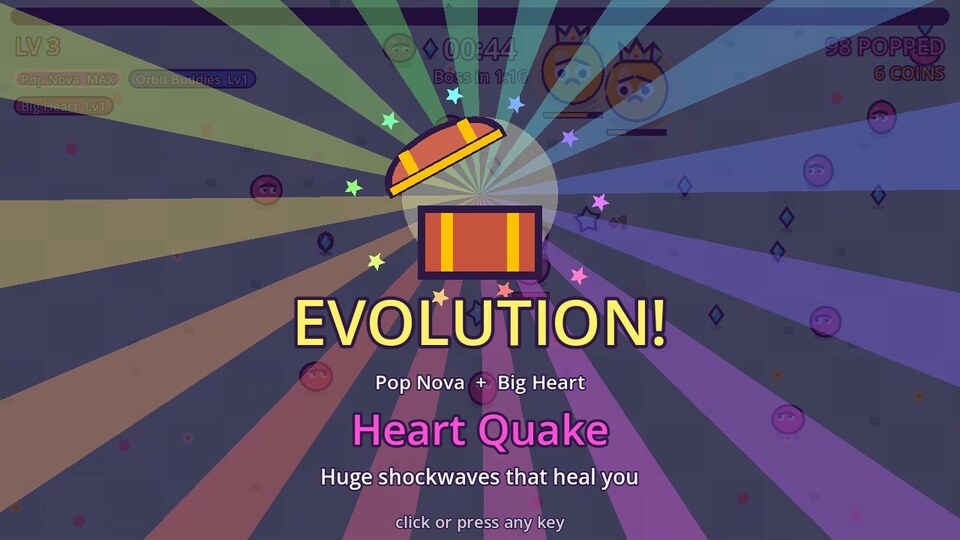
Galaxy Scepter fires three rainbow bolts every 0.28 seconds plus a 14-bolt ring every 1.3 seconds. Heart Quake is a 290-radius nova that heals you for each enemy it hits, up to 8 HP. The evolution itself is staged by the HUD: the chest rattles for a second, then reveals “EVOLUTION!” with the evolve jingle. When you close it, _evolution_fx() fires rainbow rings and hits every enemy within 520 pixels for 60 damage, times the damage multiplier.
9. The Boss and Its Attack Patterns
Every 120 seconds (BOSS_EVERY) MEGA GLOOP spawns. boss.gd extends enemy.gd, so it goes through the same arrays, damage and death code. Its HP scales with each appearance: hp = 2400.0 * (1.0 + 0.7 * (t - 1)). Its behavior is a small state machine that cycles through four patterns, ticked by main.gd calling think(delta):
const PATTERNS := ["bloom", "slam", "spiral", "summon"]- Bubble Bloom:
2 + tierrings of bullets, every other ring offset by half a step; - Belly Slam: crouch, jump to where you were, land with a shockwave and spawn blobs;
- Spiral Spit: rotating arms of bullets while it slowly drifts toward you;
- Bat Call: a ring of
5 + tierbats.
Between patterns it is in "chase". The slam shows how to make an attack fair: the landing spot is marked first, and the jump is a lerp plus a sine arc for height:
            if fired == 0:
                jump_from = position
                jump_to = pp
                main.fx.warn(jump_to, 160.0, 1.0)
                fired = 1
            if st < 0.55:
                height = 0.0
            elif st < 1.05:
                var k := (st - 0.55) / 0.5
                position = jump_from.lerp(jump_to, k)
                height = sin(k * PI) * 160.0
The boss only touches the player when height < 20.0, and its shadow shrinks while it is in the air. Boss bullets are not nodes at all, just dictionaries in main.gd's shots array, moved and checked against the player each frame and drawn by fx.gd. The boss chases at triple speed while more than 420 pixels away, and it only starts a pattern once it is close, so it never attacks from off-screen. Killing it drops a chest, 16 gems and 12 coins, with a 0.25-second hit-stop.
10. The 8-Minute Win
Victory is a single constant, WIN_TIME := 480.0, checked in _process():
    if not game_over and time >= WIN_TIME:
        _win()
_win() pops every enemy on screen, plays rainbow rings, adds a 50-coin bonus, banks the coins and shows the victory screen. The HUD always shows the next goal: “Boss in 1:42”, then “SURVIVE 0:59!”.
11. Saved Coins and the Permanent-Upgrade Shop
Meta progression lives in game_state.gd, a RefCounted script that is never instanced. It is used through const Game := preload("res://scripts/game_state.gd"), and its static variables survive scene changes without an autoload:
static var selected: int = 0
static var open_select: bool = false  # skip the title page when returning from a run
static var coins: int = 0
static var shop_levels: Dictionary = {}
static var _loaded: bool = false
The shop is a data table (Might, Vitality, Swiftness, Magnetism, Growth, Greed), each with five levels and a cost of cost * (level + 1). Buying and applying are both tiny:
static func try_buy(id: String) -> bool:
    var it := shop_item(id)
    if shop_level(id) >= int(it["max"]) or coins < next_cost(id):
        return false
    coins -= next_cost(id)
    shop_levels[id] = shop_level(id) + 1
    save()
    return true


## Total bonus from a permanent upgrade (level * per-level amount).
static func bonus(id: String) -> float:
    var it := shop_item(id)
    return shop_level(id) * float(it.get("per", 0.0))
save() writes coins, shop levels and the selected hero to user://save.cfg with ConfigFile, and ensure_loaded() reads it once. At the start of a run, main.gd applies the bonuses on top of the character's stats:
    player.max_hp += Game.bonus("vitality")
    player.hp = player.max_hp
    player.speed *= 1.0 + Game.bonus("swift")
    player.magnet *= 1.0 + Game.bonus("magnet")
Coins drop rarely from normal enemies (8%), always from elites (8 coins) and generously from bosses. Game.bank() runs on both death and victory, so even a losing run moves you forward.
12. Sound Effects Synthesized in Code
There are no .wav or .ogg files in the project. sfx.gd builds every sound at startup. A _tone() helper renders one voice into a PackedFloat32Array: a frequency glide, a waveform (sine, square, tri, saw or noise) and a decay envelope. _mix() layers voices. Then _wav() turns the samples into a real AudioStreamWAV:
static func _wav(samples: PackedFloat32Array) -> AudioStreamWAV:
    var data := PackedByteArray()
    data.resize(samples.size() * 2)
    for i in samples.size():
        data.encode_s16(i * 2, int(clampf(samples[i], -1.0, 1.0) * 32000.0))
    var w := AudioStreamWAV.new()
    w.format = AudioStreamWAV.FORMAT_16_BITS
    w.mix_rate = RATE
    w.stereo = false
    w.data = data
    return w
Sound design then becomes one line per effect. A shot is a short rising square chirp, and the boss slam is noise layered over a falling sine:
    s["shoot"] = _tone(1100, 1700, 0.07, "square", 0.12, 0.002, 2.5)
    s["slam"] = _mix([[0.0, _tone(1, 1, 0.45, "noise", 0.4, 0.002, 2.5)], [0.0, _tone(140, 35, 0.55, "sine", 0.8, 0.002, 1.2)]])
Playback uses a pool of 24 AudioStreamPlayer nodes, a little random pitch per play, and a MIN_GAP table (for example 70 ms for "shoot", 45 ms for "hit") so 300 enemies dying at once does not turn into noise. Gameplay code calls a static Sfx.play("pop") from anywhere, and the node sets PROCESS_MODE_ALWAYS so level-up and chest sounds still play while the tree is paused.
13. Game Feel: Hit-Stop, Squash, Flash, Camera Lead
Hit-stop. Elite kills, boss kills and death freeze the game for a moment. The timer has to ignore time scale, or it would take 20 times longer than asked:
func hitstop(dur: float) -> void:
    Engine.time_scale = 0.05
    await get_tree().create_timer(dur, true, false, true).timeout
    Engine.time_scale = 1.0
_exit_tree() also resets Engine.time_scale, in case you restart in the middle of a freeze.
Squash and stretch. damage_enemy() sets e.hitpop = 1.0 and e.flash = 1.0. The enemy decays both values and squashes its scale, while _draw() lerps its color toward white by flash:
    hitpop = maxf(0.0, hitpop - delta * 7.0)
    var amt := 0.07 if kind == "boss" else 0.28
    scale = base_scale * Vector2(1.0 + amt * hitpop, 1.0 - amt * 0.6 * hitpop)
Hurt flash. When the player is hit, their body flashes white (body_color.lerp(Color.WHITE, hurt_flash)) and blinks red while invuln lasts. For boss hits, hud.flash() also tweens a full-screen ColorRect from red to transparent.
Screen shake and camera lead. One shake value is raised by hits and lowered every frame. The camera also drifts toward where you are moving, so you see more of what you are running into:
    shake = move_toward(shake, 0.0, 40.0 * delta)
    camera.offset = Vector2(randf_range(-1, 1), randf_range(-1, 1)) * shake
    # camera leads a little in the direction you move
    var mv := Input.get_vector("move_left", "move_right", "move_up", "move_down") if not game_over else Vector2.ZERO
    camera.position = camera.position.lerp(mv * 70.0, minf(1.0, 3.0 * delta))
Add damage numbers and a burst on every pop, and the game feels lively without a single sprite.
14. Building It with AI
None of this code was typed by a person. It was built by Claude Code connected to the Godot editor through Godot MCP Pro. The core loop (player, enemies, auto-aim, gems, level-ups) came from one prompt in about 9 minutes. Four more prompts grew it into the game above in about 24 more minutes, 33 minutes in total:
Because the AI could run the game, send input, read errors and take screenshots through MCP, it play-tested its own work and fixed these bugs along the way:
- a broken autoload that made the editor show compile errors;
- clipped text and wrong card sizes on the character select;
- a chest lid drawn as a full circle that hid the chest;
- the boss firing attacks while still off-screen;
- a swarm wave firing on the same frame as the victory;
- the hero's hat covering the “WIN” letters on the victory screen.
You can see guards against two of them in the excerpts above: the time < WIN_TIME check on swarm waves and the boss's “close in first, then attack” rule. game_state.gd is also used as a preloaded script rather than an autoload. The debug keys left in _unhandled_input() (F2 spawns an elite, F3 maxes a weapon and its passive, F4 calls the boss, F5 skips to the last seconds) let you reach late-game states in seconds when testing. They only work in debug builds.
Watch the build on YouTube, read the details on the Pop Survivors PLUS showcase page, or play the build on itch.io. If bullet patterns are your thing, the Godot 4 bullet hell tutorial goes deeper on that side.
15. FAQ
How do I handle hundreds of enemies in a Godot 4 survivors-like?
In this game the enemies are plain Node2D nodes that only hold stats and draw themselves. One manager script moves them all, and a spatial hash (a Dictionary of 64-pixel grid cells) means each enemy, bolt and orbiting star only checks the nine cells around it instead of every other enemy. The enemy count is capped at 320, and enemies that fall more than 1300 pixels behind are moved back in front of the player.
How does weapon evolution work?
Each weapon is paired with one passive item. When the weapon reaches its max level (5) and you own at least one level of the paired passive, the next treasure chest you open evolves it instead of giving a random level-up. Chests drop from elite enemies, which spawn every 45 seconds, and from each boss.
How do I save coins and permanent upgrades between runs?
The game keeps meta progression in a RefCounted script with static variables, which survive scene changes. Coins and shop levels are written to user://save.cfg with ConfigFile when a run ends and after every purchase, and loaded once at startup. Each upgrade adds level times a per-level amount, for example +8% damage per level of Might.
Can I make sound effects in Godot without audio files?
Yes. The game builds 21 sound effects at startup by computing samples for sine, square, triangle, saw and noise waves with pitch glides and decay envelopes, encoding them as 16-bit PCM into a PackedByteArray, and assigning that to an AudioStreamWAV. A pool of 24 AudioStreamPlayer nodes plays them, with a minimum gap per sound so big fights do not get noisy.
Let AI Build and Play-Test Your Godot Game
Godot MCP Pro connects Claude Code, Cursor, Cline and other AI assistants to the Godot 4 editor with 190 tools: build scenes, write scripts, run the game, simulate input and fix what breaks.
create_script
play_scene
simulate_key
get_game_screenshot
get_editor_errors
One-time purchase · Lifetime updates · See pricing details